Doug Brown began cobbling together another computer using a motherboard from an eMachines EL1200. The EL1200 was a cheap machine that came out in 2008.
I began cobbling together another computer using a motherboard from an eMachines EL1200. The EL1200 was a cheap machine that came out in 2008. I found the motherboard on eBay for next to nothing, and it was also easy to find an Athlon X2 4850e to go with it. This particular motherboard only officially supports 2 GB of RAM in each of its two slots for a total of 4 GB, but I knew that 4 GB DDR2 sticks existed, so I went ahead and tried to put 8 GB in it. Why not? They were easy to find and inexpensive.
The 8 GB of RAM worked perfectly fine and I was able to boot into Linux. This honestly didn’t surprise me too much. I ran memory tests and they all came back perfect. The computer worked great with 8 GB of RAM.
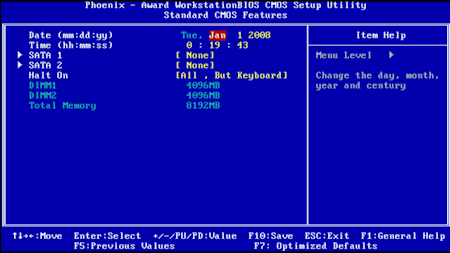
Then, I tried to enter the BIOS setup by pressing F2 at startup when the eMachines splash screen came up:
The screen went black, and then just sat there with a flashing white cursor in the upper-left corner. I wasn’t able to break it out of this hang with any special keystrokes. It was completely frozen. I could only get past it by rebooting. I figured that the only weird thing I had done was go past the maximum RAM requirements, so I tried putting in two 2 GB sticks instead. With only 4 GB of RAM installed, I was able to get into the Phoenix Award BIOS with no trouble.
See more on downtowndougbrown.com.
— Source: Adafruit Industries – Makers, hackers, artists, designers and engineers! — Read More